
We bet you’ve been there too. You text a brand on Instagram about a missing order. Someone replies, asks for the order number, and tells you they’ll “pass it on to the team”. The next day you call the support line. New person, same questions: order number, email, what happened? By the time you get an answer, you’ve explained the same problem three times to three different people who all work for the same company.
Is that a problem? Yes.
But this isn’t a service issue. It’s a structural one.
The brand has channels, but no solution that connects them. And the cost of this is bigger than most companies realise. Research shows that 76% of clients expect consistent interactions across departments, and 54% say it feels like companies don’t share information.
Omnichannel customer support is the fix. Not being on more channels, but connecting them into one conversation. That way, the agent who picks up your call already knows what you wrote in the chat last week. And the chatbot that greets you on the website remembers what you bought last month.
In this article, we’ll break down what omnichannel customer support is, how it differs from multichannel, the real benefits, and the best practices to build it in your business.
What omnichannel customer support actually is
Omnichannel customer support is a way of organising customer service so that all channels, like phone, email, live chat, social media, messaging apps, in-store, work as one connected system. The user can switch between them mid-conversation, and the support team picks up exactly where the previous touchpoint left off.
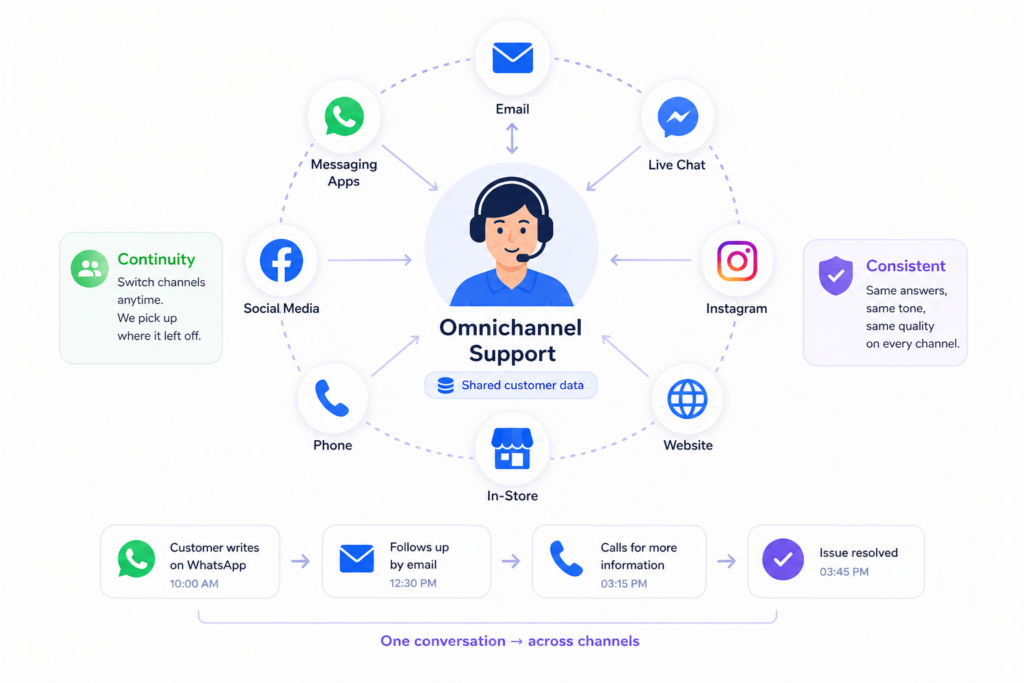
Three things make a support system genuinely omnichannel:
- Shared customer data across all channels. When a client contacts you on WhatsApp, the agent sees the email they sent two days ago, the chat they had with the bot last week, and the order they placed last month.
- Continuity of the conversation. If someone starts on Instagram and finishes on the phone, those become one ticket with two touchpoints.
- Consistent tone, policy and answers. A customer asking the same question through chat and through email gets the same answer, in the same voice, with the same accuracy.
The term itself comes from retail. In the early 2010s, companies like Disney and Starbucks started using “omnichannel” to describe seamless customer experiences: order online, pick up in-store, return through the app, all without losing the thread. Customer service borrowed the idea later, when it became obvious that the same logic applied.
Today, omnichannel support is a basic requirement of any business. According to Salesforce State of the Connected Customer, 80% of customers say the experience a company provides is as important as its products and services. When the experience breaks because channels don’t talk to each other, customers don’t blame the channel. They blame the brand.
Key benefits of omnichannel customer support
Most articles list omnichannel customer support benefits as a bag of generic wins: better customer satisfaction, higher loyalty, improved efficiency. The reality is more specific. Each benefit has a measurable mechanism behind it, and skipping that mechanism is why so many omnichannel projects underdeliver.
Less repeating, better service
The Aberdeen Group research shows that companies with strong omnichannel engagement keep around 89% of their customers, against 33% for those with weak strategies.
The mechanism is simple. Repeating yourself feels like the brand doesn’t care. Not having to repeat yourself feels like the brand remembers you. People stay where they feel remembered.
Faster resolution times across channels
According to Zendesk’s CX Trends report, companies that connect their channels resolve issues up to 26% faster than those that don’t. The difference is mostly hidden time: the seconds and minutes agents spend opening tabs, searching CRMs, and asking colleagues for context. Multiply that by thousands of interactions, and you get hundreds of hours saved every month.
Higher revenue per customer
Connected experiences sell better than disconnected ones. When a brand knows a customer’s history, it can recommend the right product, time the proper message, and avoid awkward moments.
McKinsey research found that clients who interact with a brand across multiple channels generate, on average, 30% more LTV than single-channel customers.
The catch: this only works if the channels are connected. Multichannel without integration produces the opposite. It confuses customers, misses cross-sell opportunities, and leads to abandoned carts.
Less burnout and lower agent turnover
This benefit is rarely mentioned, but it matters more than most people think. Agents in fragmented support setups deal with frustrated customers all day. Customers who have to repeat themselves arrive angry. Agents who can’t see the full picture feel powerless.
Connected omnichannel customer support systems reduce friction. Agents see context, solve issues faster, and spend less time absorbing frustration that wasn’t theirs to begin with.
Customer data you can use
Omnichannel customer support builds a customer profile from every touchpoint across every channel in real time. That data feeds product decisions, marketing campaigns, and service improvements.
This is the long-term benefit that pays off the most. Faster resolutions and higher retention show up in monthly reports. Better customer data shows up in the strategic solution you make a year from now.
Omnichannel vs Multichannel
The two terms get used interchangeably, but they describe different things.
Multichannel means a business is present on several channels. It can be phone, email, chat, socials, in-store etc. The point is that each channel works on its own.
Omnichannel also uses several channels. But the difference is that they are connected. In omnichannel customer support, the customer profile, conversation history, and context all flow between channels.
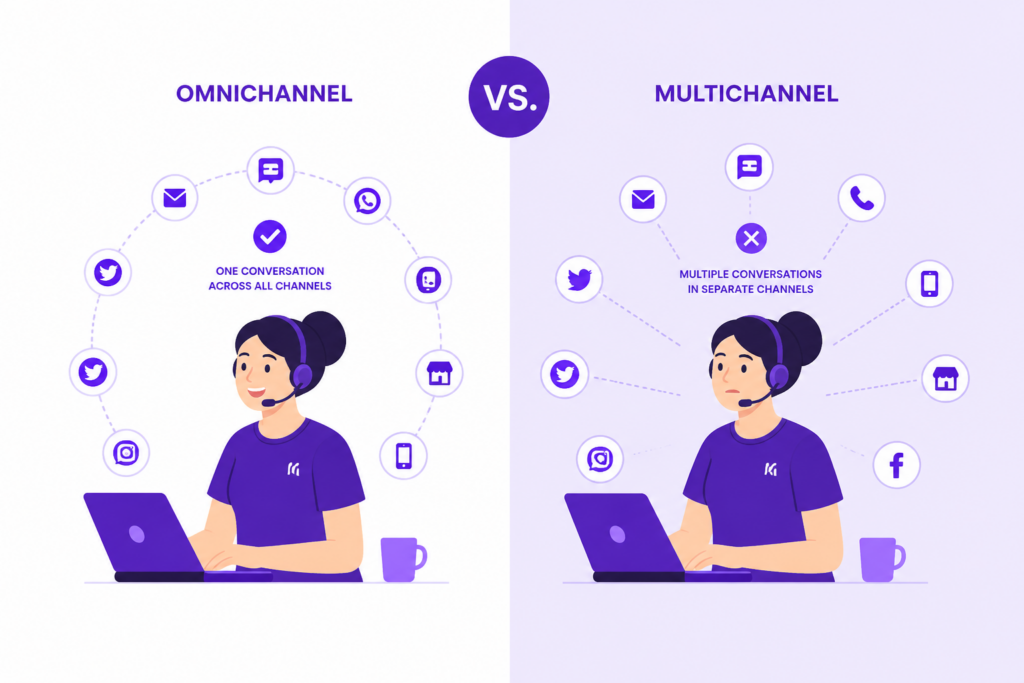
The simplest way to see the difference is to count the systems. If your support team uses one tool that shows every customer touchpoint in one view, that’s omnichannel. If they juggle four separate inboxes and copy-paste information between them, that’s multichannel with extra steps.
How to provide omnichannel support
Going omnichannel is more than adding new software or showing up on every channel. It’s a structural change: how a brand sees its customers, how data moves between teams, and how agents work day to day. Done well, it improves retention and revenue. Done in a rush, it leads to a messy set of disconnected tools.
Here are six steps to build omnichannel customer support.
Step 1. Map the customer journey
Before adding new channels, understand where your customers spend time and where they expect to find you. Younger audiences use messengers and socials. B2B clients rely on email and LinkedIn. Retail buyers prefer live chat on the product page.
The common mistake is adding channels just because competitors have them. A neglected TikTok account or a slow chat widget does more damage than not being there at all.
Step 2. Audit your tools
Most companies already have part of an omnichannel customer support setup. The problem is that these systems don’t talk to each other.
Before buying anything new, list every channel and tool you use. Note what data each one collects and where that data stops. Bottlenecks usually become clear within an hour, and the audit costs nothing.
Step 3. Choose a tech stack
A polished demo is the easiest part of any sales pitch. The real questions are simple: can the platform connect to your tools, how fast does it sync data, and how easy is it to leave if needed?
We recommend paying attention to:
- Open API – needed to connect tools outside the platform’s ecosystem
- Webhooks instead of polling – faster updates instead of delays
- Ready-made integrations for popular messengers and CRMs
Specialised platforms like Intelswift, Zendesk, and HubSpot are built around these needs. The thing to insist on, regardless of vendor: conversation history must appear in the agent’s window automatically. Without that, omnichannel exists only on the slide deck.
Step 4. Integrate the data
The system should recognise that an email, a phone number in Telegram, and a website visitor are the same person. All data should merge into one profile in real time.
First, match users using stable identifiers, then fall back on temporary ones like cookies or device IDs. Second, check every new contact against existing profiles to avoid duplicates.
Step 5. Train the team and rewrite the KPIs
Even the best tools fail without the right setup. Two things matter most:
- Drop rigid scripts.
- Give agents full customer context and the ability to act on it.
For omnichannel customer support, better metrics are First Contact Resolution and CSAT. They reflect the goal: solve the issue once, clearly, in any channel.
Step 6. Start small and test
We recommend starting with the website-plus-messenger combo. Let chat visitors continue the conversation in Viber, Telegram, or WhatsApp instead of forcing them to stay on the live-chat tab.
Track four metrics from day one: resolution time, repeat contact rate, CSAT, and lifetime value.
Omnichannel support: Use cases
The clearest way to understand omnichannel is to look at brands that do it well. The two examples below come from different industries, but follow the same idea: every touchpoint connects to the next.
How Sephora uses one system to power customer interaction
Sephora’s Beauty Insider programme is one of the best-known examples of omnichannel in retail. It has over 34 million members worldwide and drives about 80% of the company’s sales. Customers who use multiple channels generate 190% more revenue than those who stay on one.
The system is built around four main channels:
- physical stores,
- the website,
- the mobile app,
- social commerce.
The mobile app sits at the centre. It works as a hub for loyalty points, AR try-ons with the Virtual Artist tool, product reviews, and store info. Every interaction updates the same Beauty Insider profile.
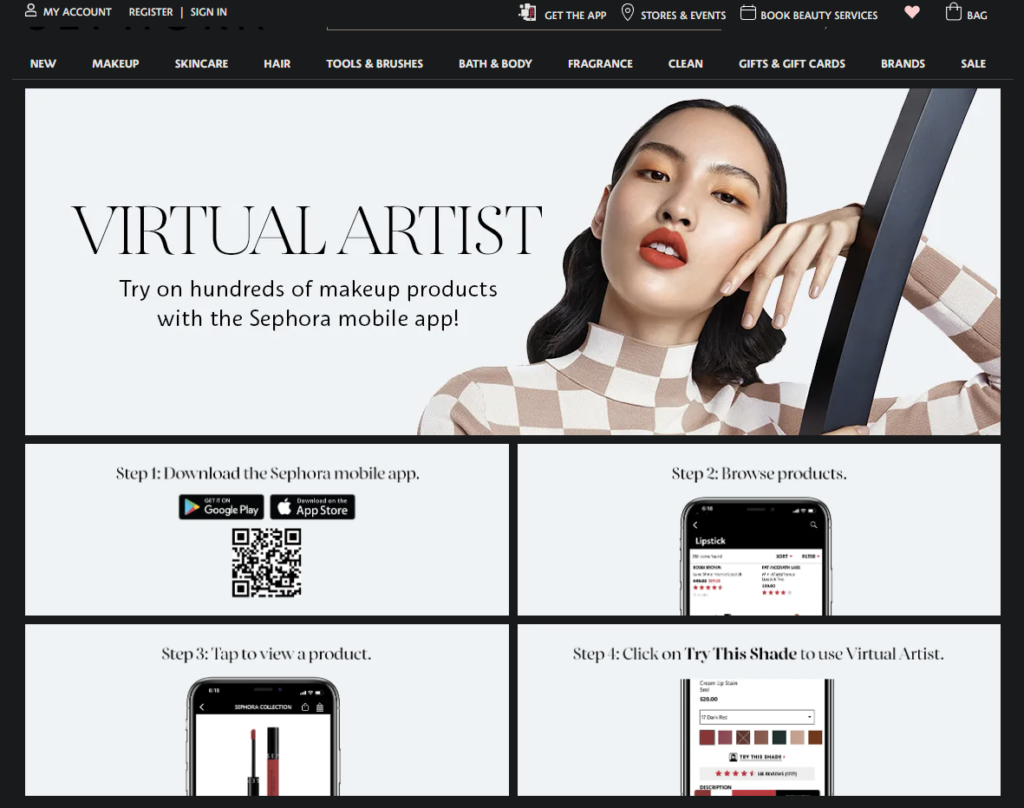
Support benefits from this setup too. When a customer reports an allergic reaction, the agent sees the full beauty profile: skin type, saved shade matches from store visits, and ingredients flagged before.
How IKEA connects online browsing with in-store shopping
IKEA built a quietly ambitious omnichannel customer system across four channels:
- physical stores,
- the website,
- the IKEA app,
- IKEA Place.
The last one is an AR tool, launched in 2017, that lets customers preview furniture in their rooms before buying. Add an item to a wishlist on the website, and it appears in the app. Try a sofa in AR, and the colour options sync to your next in-store visit.

The IKEA Family loyalty programme connects everything into one profile. According to McKinsey, omnichannel customers are 2.5 times more valuable than single-channel ones.
Final word
Omnichannel customer support isn’t a piece of software you install. It’s a way of treating every customer touchpoint as part of one continuous conversation, no matter where it starts or ends.
Companies that get this right don’t have more channels than their competitors. They have channels that connect, teams that share context, and metrics that reward solving the problem instead of just handling the ticket.
Customers notice the difference from the first interaction. Whether they stay or leave is often decided long before they say goodbye.